Deftara CRM · For builders
Free for now
Run the building office from your phone.
Capture an enquiry in ten seconds, track every building-permit file and the papers it still needs, plan each site’s day and see what each job still owes you. We built it for a design-and-build firm in Nepal, where it runs in Nepali and English.
Who it’s for
For builders juggling permits, sites and WhatsApp.
Small design-and-build firms where the owner and office staff handle enquiries, permit paperwork and several active sites at once. If you only need a contact list and a sales pipeline, a general CRM will do.
Mostly quoting jobs? See Deftara Quoting- Owners chasing enquiries by phone and WhatsApp
- Offices tracking permit files and missing papers
- Firms paying site crews daily wages
- Offices waiting on clients for permit papers
What it does
What comes off the whiteboard and out of the notebook.
- Today screen
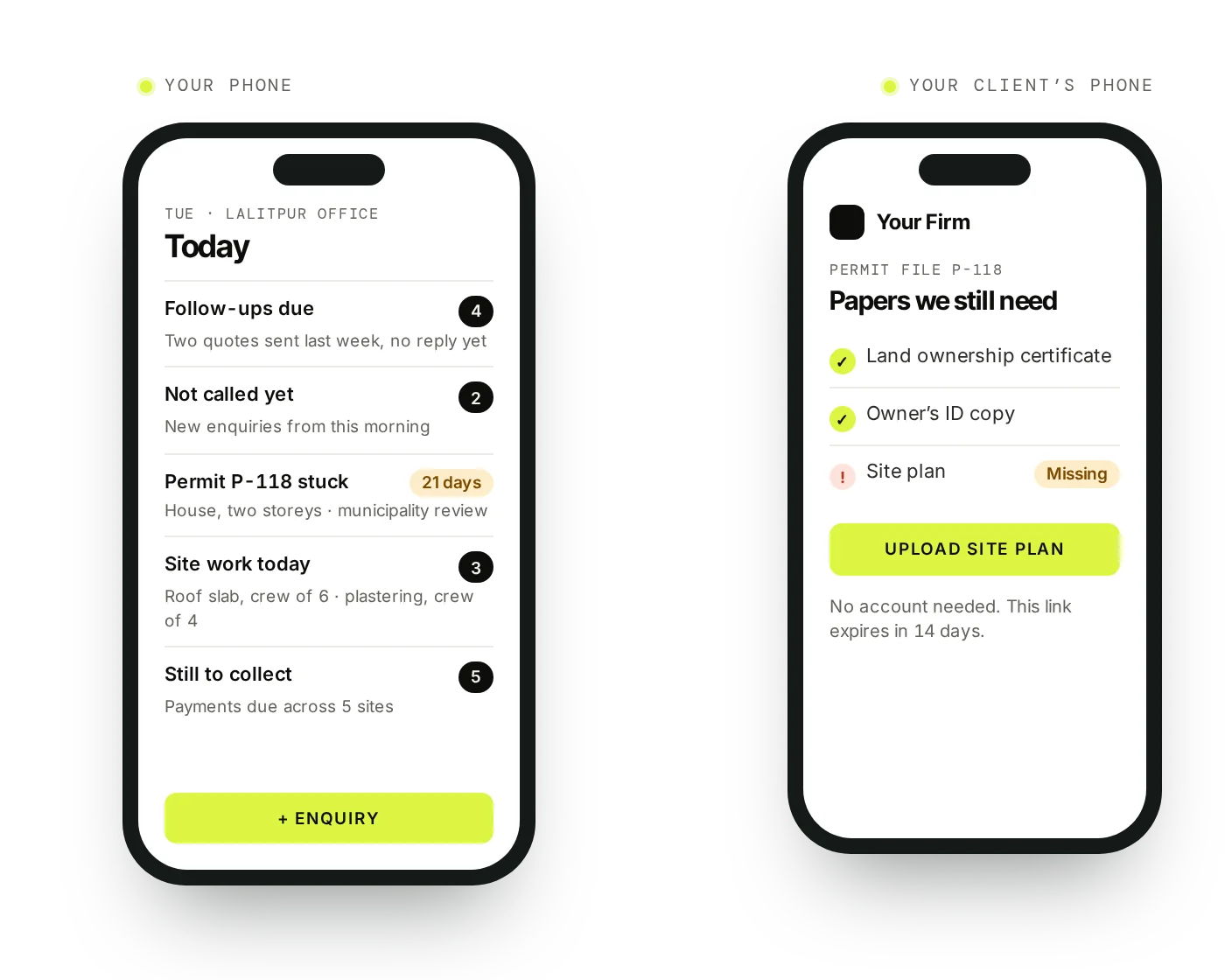
- One list of follow-ups due, enquiries nobody has called yet, permit files stuck too long, today’s site work and the money still to collect.
- Ten-second enquiry
- Name, phone and service from one button. If the number already belongs to a client, it offers to add the enquiry to them.
- Enquiry pipeline
- A board with stages you set, one tap to move a card on, a reason required for every lost job, and a WhatsApp message written for each stage.
- Permit tracker
- Files grouped by stage with the days spent in each, a checklist of required papers, a count of correction rounds, and no submission while a paper is missing.
- Client upload link
- Send a private link and the client uploads the papers you asked for from their phone, without an account. Each link expires after 14 days.
- Site plans
- Daily work items with crew size and materials, ticked off when done and carried over when not, plus weekly goals for each site.
- Attendance and wages
- Mark the whole crew in or out, morning and evening, and see each worker’s days and pay for the week.
- Job money
- The agreed price with variations, payments received and costs, with wages counted in, showing what’s left to collect per site and per client.
How it works
What happens after the phone rings.
Enquiry
Capture the call in ten seconds.
Follow up
Work the pipeline from the Today screen.
Permit
Open a permit file and collect the papers.
Build
Plan each day on site and mark attendance.
Collect
Track payments against the agreed price.
FAQ
Questions about Deftara CRM.
What does it cost?
Nothing for now. We set up your own copy free, with your name, your stages and your team’s logins. Changing it for another country, like the currency and dates, is scoped with you before any work starts.
Is it shared software or our own system?
Your own. Each business gets its own copy, with its own data, set up with your name.
Who can see the money?
Only the people the owner allows. The owner ticks which areas each person can use, money is off by default, and new sign-ups see nothing until approved.
Does it send WhatsApp messages for us?
It opens WhatsApp with the message already written. You press send.
Can we get our data out?
Yes. The owner can download clients, enquiries, permit files and money as CSV files that open in Excel.
Can it work for a builder in Australia or the US?
Yes, with changes. It’s built for Nepal: Nepali dates, rupees and the municipal permit process. For Australia or the US we’d switch the currency, dates and permit stages to yours.
Does it work offline?
No, it needs a connection. It runs in the phone’s browser and can be added to the home screen.