Deftara Quoting · For trades
Free for now
Quotes priced from your own costs.
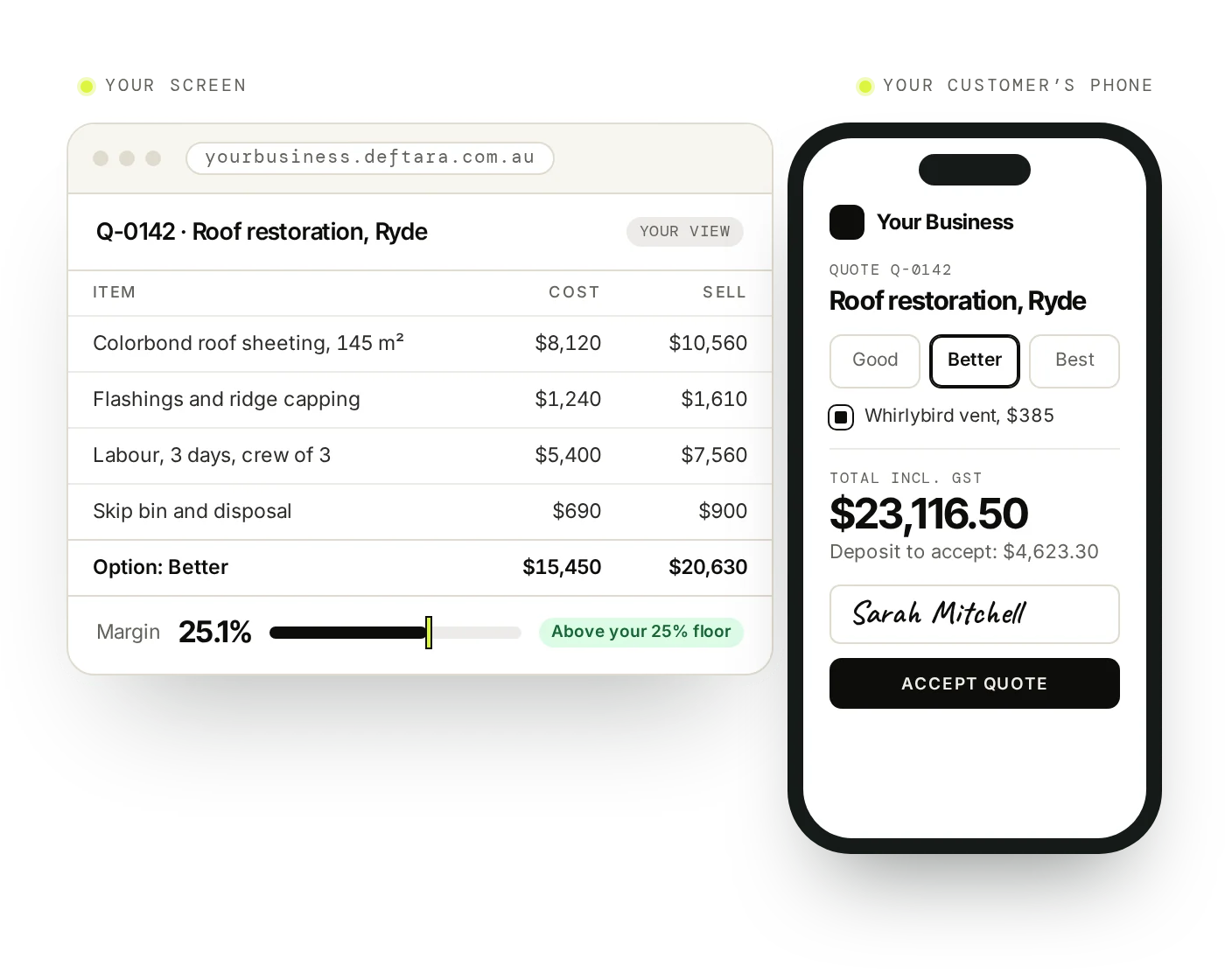
Build each quote from your price list, check the margin before it goes, and let the customer accept online. When they say yes, the same app runs the job and the invoices. We built it for an Australian roofing business and set it up for other trades.
Who it’s for
For trades that quote before they work.
Roofers, builders, carpenters and other trades that price every job and wait for a yes. If your jobs are small and priced off a set rate, a quote template or an off-the-shelf job app will do. This is for businesses where the margin on every quote matters.
A roofer? See how it quotes a re-roof A carpenter? See how it quotes a deck Managing permits and site crews too? See Deftara CRM- Businesses that quote on cost plus margin
- Teams with an owner, estimators and crew
- Jobs that need a site visit before the quote
- Work paid in deposit, progress and final invoices
What it does
See your margin before the customer sees the price.
- Quote builder
- Line items from your price list, priced as your cost plus your markup, with a warning when the markup drops below your floor. Add good, better and best options and optional extras. How estimating works
- Your price list
- Materials and labour with supplier and SKU. Costs older than 90 days are flagged, and you can raise prices across a category by a percentage.
- Branded PDF quotes
- Your logo, business details, inclusions and exclusions on an A4 PDF, previewed on screen before it goes.
- Online acceptance
- The customer opens a link, picks an option and extras, sees the total with GST and the deposit, and accepts by typing their name. Customers never see your costs or margin.
- Pipeline and follow-ups
- Enquiry to won or lost on a board, with the reason recorded for every lost job. Quotes that need a follow-up or are about to expire are flagged. How job management works
- Photos from customers
- Send a link and the customer uploads up to 40 photos of the job. Location data is stripped from each one.
- Jobs and invoices
- Open a job from an accepted quote in one tap, with a calendar, variations and sign-off notes. Raise deposit, progress and final invoices and record payments against them. How invoicing works
- Reports
- Win rate, average quote, the markup you actually achieved, and conversion by job type and lead source.
How it works
How a job moves through it.
Enquiry
Log the call and book the site visit.
Price
Build the quote from your price list and check the margin.
Send
Email a link, or share the PDF from your phone.
Accept
The customer picks options and accepts online.
Deliver
Schedule the job and invoice each stage.
FAQ
Questions about Deftara Quoting.
What does it cost?
Nothing for now. We set up your own copy free, with your logo, your price list and your team’s logins. New features built just for you, and our marketing services, are optional paid extras. One condition: if nobody signs in to your copy for 90 days, we archive it and tell you first. We keep your data and bring the copy back whenever you ask.
Is it shared software or our own system?
Your own. Each business gets its own copy of the app, with its own data, and your logo and business details on every quote.
Can we start with quoting only?
Yes. It can run as quotes only, or with the pipeline, jobs, invoices and reports switched on.
Does it work on a phone?
Yes. It has a phone layout and can be added to your home screen, so you can price and share a quote on site.
Does it handle GST?
Yes. Quotes and invoices show GST, and you can switch it off if you aren’t registered.
Does it connect to Xero?
It exports invoices in a format Xero can import. There is no live sync.
Can customers pay by card?
Not yet. You record payments against each invoice.
Something we haven’t covered? Ask us directly.